Português
Рус
ICQ Client Setup
Melhor em IE4 800x600 • Best in IE4 800x600
ICQ Client Setup
ICQ 98/99: port 4000
ICQ 2000-2003: port 5190
Server: icq.antiga.net ►
Home
Web Proxy
ICQ
IRC
Modem
Napster
Contributors
Chat
[ NAVIGATION ]
About the Project
Client Setup
Request UIN
Vogons Thread
<< Antiga.net
[ SERVER ]
icq.antiga.net
ICQ 98/99 >>
:4000
ICQ 2000+ >>
:5190
[ ICQ 98a / 99a / 99b ]
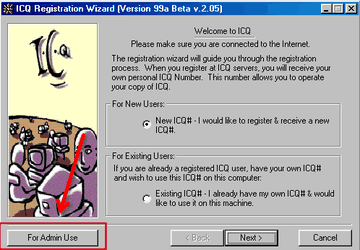
Install and launch your ICQ 98/99 client.
Click the
"For admin use"
button.
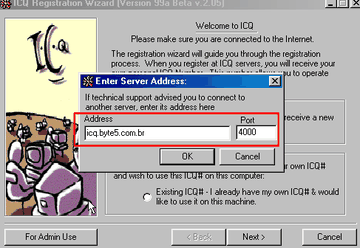
Enter
icq.antiga.net
as Server and
4000
as Port.
Click
OK
and proceed as normal.
Passo 2 / Step 2
Passo 3 / Step 3
[ ICQ 2000a / 2001 / 2002 / 2003 ]
Install and launch your ICQ client.
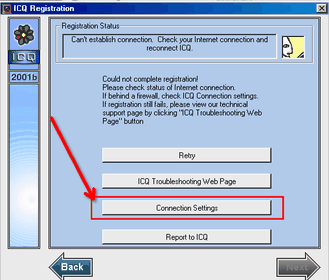
Begin registration or login; click
Next
until you see a connection error.
Click
"Connection Settings"
.
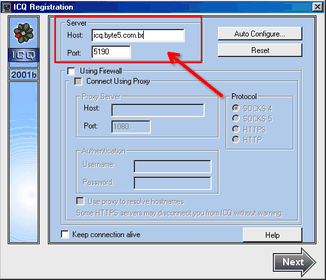
Enter
icq.antiga.net
in Host and
5190
in Port.
Click
OK
and continue normally.
Passo 3 / Step 3
Passo 4 / Step 4
[ Video Tutorial (PT-BR) ]
Watch the video tutorial (in Portuguese-BR):
(YouTube embed — requer navegador com suporte a iframe)
[ Contact ]
Email:
caiot5@gmail.com
• ICQ:
#32693290
© 2021–2026 Antiga.net —
caiot5@gmail.com
—
chat.antiga.net
ICQ
|
Setup
|
UIN
|
Antiga.net


 Home
Home